Introduction: One Program, Two Ways to See It
FlowBook is the book you are reading. FlowScript is Flow-Like’s typed text form for workflow logic. A Flow is that executable logic, whether you inspect it as text or as a visual graph.
The distinction matters because most companies are extending an estate that already exists. Customer data lives in current databases. Core processes cross older services, SaaS products, files, queues, and devices. New software has to join that estate without making it harder to operate.
AI raises the rate of change. A useful prototype can now arrive in days, sometimes hours. The hard question comes later: can the company operate it safely after the original author has moved on? Faster generation increases the value of a shared application model.
Flow-Like begins with a practical expectation:
Running software should carry enough structure and evidence to explain itself.
The program should retain visible operations, typed boundaries, execution order, permissions, versions, and failure evidence after it leaves its author’s editor. That expectation guides the language, the visual workflow, and the platform around them.
The map
Section titled “The map”The following picture is enough to place the terms used throughout the book.
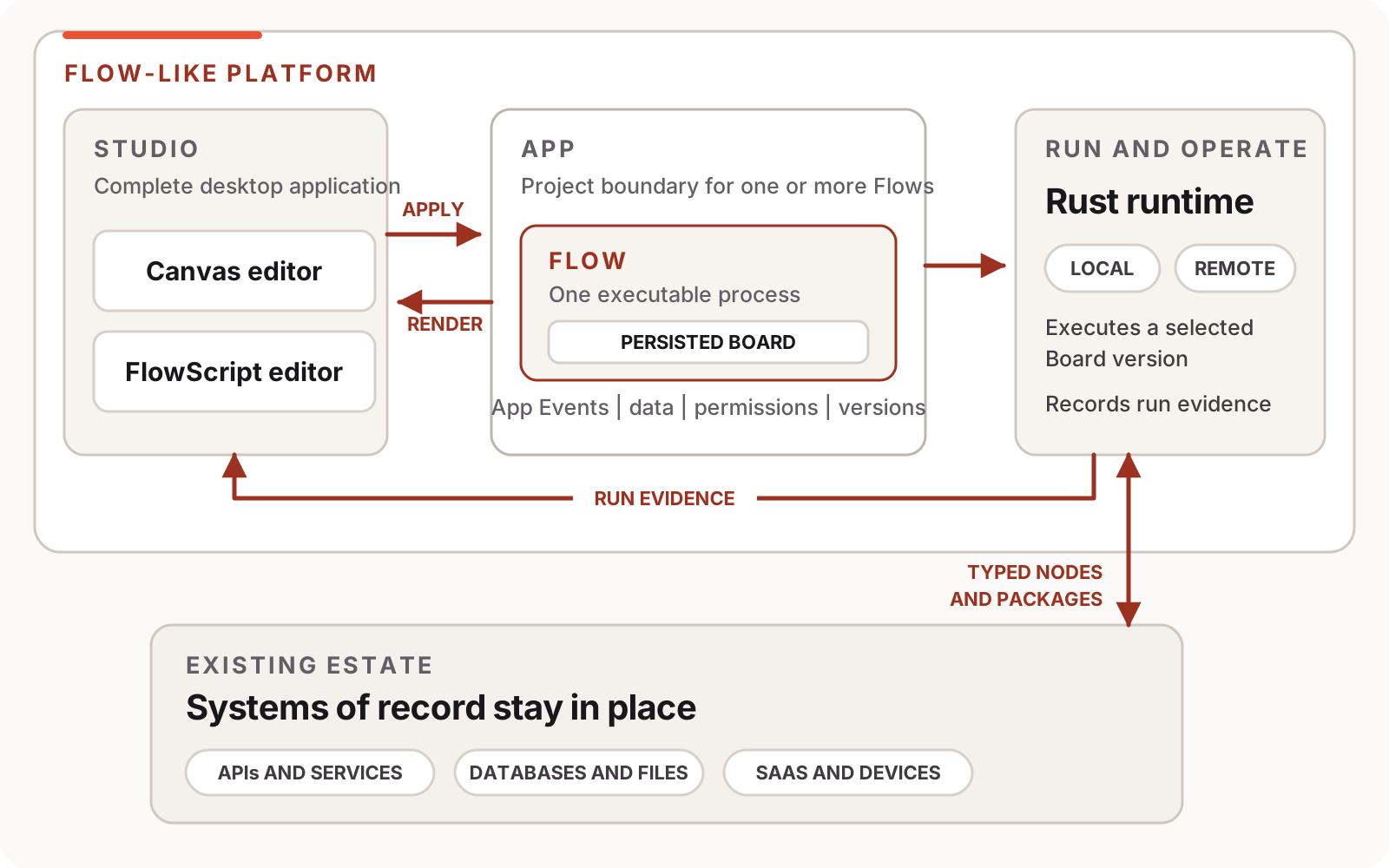
| Term | Meaning in this book |
|---|---|
| Flow-Like | The platform that supplies authoring, execution, data, interfaces, packages, permissions, and operational evidence. |
| Studio | The complete desktop application. It includes Flow editing, Data Studio, packages, run inspection, and other App tooling. |
| App | The project and governance boundary for related Flows, data, Events, members, and release settings. |
| Flow | One executable workflow inside an App. |
| Canvas / Board | The visual graph of a Flow. Canvas names the editor; Board is the precise name for the persisted graph model. |
| FlowScript | The typed text view used to author the same Flow logic. |
| Runtime | The Rust execution system that runs the Board and records evidence about the run. |
When this book says “open it in Studio,” it means the desktop application. When it refers to a node on the canvas or a change to the Board, it means the visual representation of the logic. FlowScript always refers to the textual representation.
Why the company should care
Section titled “Why the company should care”An AI-first company will encode more decisions and routine work in software. If every team builds that logic with its own prompt scripts, credentials, deployment conventions, and logs, the operating model fragments while the amount of software grows. Prototype speed then creates more systems that only their authors can safely change.
Flow-Like puts Apps, deterministic logic, model calls, data access, permissions, versions, and run evidence inside one inspectable model. Teams still choose architectures and operating policy. The platform gives those choices a common place to live and a consistent path to execution.
Adoption can begin with one process. A company might place a fragile integration, a new AI classification step, or an internal tool in a Flow while the current database and services stay in place. The Flow calls those systems through typed nodes or packages, and existing callers can reach it through an Event or API. Over time, more logic can move into visible Flows where that improves ownership and operation. A rewrite is not the entry fee.
For a technical decision-maker, that is the reason to keep reading: the platform offers a way to increase software output without multiplying private execution models. The rest of this book tests that claim at developer depth.
Two views of one program
Section titled “Two views of one program”On the canvas, a developer can see where data comes from, how execution branches, and which node produced a result or failure. That map is valuable during design, review, and incident response.
Text supports a different kind of work. It is dense, searchable, easy to compare, and efficient when a Flow contains many operations. It also works well with language tooling and coding agents.
Inside Studio, the canvas and the FlowScript editor act on one Flow model. Change the graph and the source changes. Apply a FlowScript edit and Studio reconciles it into Board operations. Neither view is a separately maintained diagram.
This contract avoids a familiar source of drift. A diagram can be correct on the day it is drawn and wrong after the next release. Here, the visual structure is part of the program that runs. Runtime evidence can point back to the node responsible for it.
Why FlowScript exists
Section titled “Why FlowScript exists”A useful workflow platform needs more than a few high-level boxes. Real applications transform values, branch, iterate, manage state, call services, and compose reusable operations. Exposing those details keeps the graph honest, although a large graph takes time to navigate and edit.
Some workflow tools deal with scale by placing a JavaScript or Python editor inside one node. The node stays small while a second application grows behind its label. Dependencies, side effects, and error paths become harder to inspect from the graph.
FlowScript provides the density of text while preserving Flow-Like’s typed building blocks. Its calls, expressions, branches, loops, functions, and Events reconcile to nodes and connections the canvas can show. A developer can move to text for a precise change and return to the graph for locality or run evidence.
When the catalog lacks a reusable capability, a package can add scoped WebAssembly nodes with declared contracts. The new capability then becomes a visible building block for later authors. This extension model gives developers room to solve specialized problems without placing an uninspectable program inside a generic code box.
Where AI fits
Section titled “Where AI fits”Once the application model is clear, AI has two natural places in it.
FlowPilot or another coding agent can author a change. It may propose FlowScript, assemble nodes, or adapt an existing App. The proposal passes through the same declarations, type checks, reconciliation, and review path as a human edit. An agent receives useful constraints instead of privileged access to a hidden shortcut.
A model can also perform one operation during a run. Classification, extraction, summarization, and response generation are reasonable examples because they involve semantic uncertainty. The model call should appear as an explicit node with narrow inputs, a typed result, an error path, and usage evidence. Deterministic nodes prepare and validate the data around it.
Exact work stays deterministic. A probabilistic call adds no value when the outcome is already defined, as with arithmetic, schema validation, identifier handling, or a known routing rule. Keeping the uncertain boundary small lowers cost and latency and gives failures a specific place in the Flow.
Later chapters return to model selection, usage controls, and AI-authored changes after the core Flow model is familiar. That sequence keeps AI inside the architecture instead of turning it into a separate topic with its own vocabulary and runtime assumptions.
Who this book serves
Section titled “Who this book serves”FlowBook is written primarily for developers. It assumes basic programming familiarity and explains the Flow model before opening parser, runtime, and deployment internals. TypeScript experience will make parts of the syntax familiar, but it is not required.
Domain experts, operators, and technical leaders can follow the same path through the worked applications. The canvas gives them a way to inspect the process without requiring a second, manually maintained explanation. Chapters that focus on language internals can be skipped and rejoined later.
What we will build
Section titled “What we will build”The first application is Incident Triage, a deterministic Flow that receives a report, normalizes it, classifies severity, branches, and records the result. It needs no model, account, API key, or external service. You will edit it from both views and break it on purpose so the run evidence has something useful to show.
Each language feature then stays tied to a concrete problem, its FlowScript form, the graph it represents, and the evidence left by execution. The later Incident Room application combines those ideas in a private document assistant and introduces model calls only where the task needs semantic judgment.
The book names release boundaries when they matter. A construct that does not round-trip safely will be identified. Deployment policy will not be presented as a language guarantee. Performance claims will stay attached to the workload that produced them.
Chapter 1 begins with the incident that made this level of visibility feel necessary: a room full of capable people waiting for the only person who understood the failing system.