9. Expressions, Operators, and Readable Sugar
FlowScript can describe several nodes in a few familiar lines:
let urgent = production && (attempts >= 3)let status = urgent ? "critical" : "investigate"let summary = `${status}: ${report}`incident.status = statusThis describes a graph containing Integer Greater Than or Equal, Boolean And, Select, String Format, and Set Field nodes. Apply resolves each expression against the catalog and creates or updates the corresponding nodes, pins, values, and wires. No JavaScript engine evaluates it.
FlowScript may shorten a Flow only when it preserves the exact node contract. The renderer uses a short form only when it can reproduce that contract. Otherwise, the explicit call keeps every meaningful setting visible.
Release check: The current repository implements arithmetic, comparison and Boolean lowering, unary
!and-, four compound assignments, value-selecting ternaries, template literals, and Struct field writes. It rejects mixed known operand types, although the diagnostic does not yet offer the intent-specific repairs proposed in Section 9.1. Operator and template rendering preserve configured extra pins in the cases below. Known asymmetries remain: Float equality and inequality may render as operators that text cannot reconcile; Integer division’s declared result conflicts with its live node output; and a Struct Getfoundoutput may be mistaken for field-value sugar. These are implementation gaps.
9.1 Arithmetic, comparison, and Boolean expressions
Section titled “9.1 Arithmetic, comparison, and Boolean expressions”An operator lookup uses its symbol and operand type. Given:
let urgent = attempts >= 3Because both operands are Integers, FlowScript selects Integer Greater Than or Equal and connects
its Boolean output to the next consumer. The Board still shows the operation that made urgent.
The current operator families are intentionally specific:
| Values | Short forms that currently lower to catalog nodes |
|---|---|
| Integer | ==, !=, >, >=, <, <=, +, -, *, %, ** |
| Float | >, >=, <, <=, +, -, *, /, ** |
| String | ==, !=, + |
| Boolean | ==, &&, ||, ^ |
The parser recognizes more tokens than this table lists. Apply still needs an unambiguous contract for the symbol and operand types in the active catalog. This is where syntax meets the catalog installed for the current Flow.
The parser recognizes |, though current reconciliation has no operator node mapping for it.
=== and !== are accepted compatibility spellings and normalize semantically to == and !=;
FlowScript does not define a separate JavaScript-style identity comparison. Integer / is omitted
because the operator registry expects an Integer result while the live Integer Divide node returns
a Float. Until those declarations agree, use the explicit catalog operation and inspect its Float
output.
Float equality usually needs a tolerance. The Float Equal node exposes that input, so a == b
cannot carry the full decision. Choose it in an explicit call:
const closeEnough = float::equal({ float1: measured, float2: expected, tolerance: 0.001,})This keeps an operational assumption visible in both source and node. No global tolerance is silently inherited.
Precedence is familiar; canonical source is explicit
Section titled “Precedence is familiar; canonical source is explicit”FlowScript reads binary expressions with the usual precedence groups. From low to high they are
Boolean OR, Boolean AND, |, then ^, equality, ordering comparisons, addition and subtraction,
multiplication/division/modulo, and exponentiation. Exponentiation associates to the right; the
others associate to the left.
The parser can therefore understand:
let urgent = production && attempts >= 3 || manuallyEscalatedThe canonical renderer adds parentheses around nested binary expressions:
let urgent = (production && (attempts >= 3)) || manuallyEscalatedThe meaning stays the same. The parentheses expose the expression tree and its operator nodes, without asking reviewers to recall precedence.
Types decide; FlowScript does not guess intent
Section titled “Types decide; FlowScript does not guess intent”The + symbol may identify Integer Add, Float Add, or String Concat. FlowScript chooses only when
the operands determine one meaning. Matching String, Integer, and Float pairs use their respective
families. An Integer literal may adopt the Float family when its other operand is a known Float,
as in ratio * 2. Separately typed Integer and Float values require an explicit conversion.
Consider the deceptively small expression:
let result = "5" + 1Two results are plausible:
- numeric addition after parsing the left side:
6; or - text concatenation after formatting the right side:
"51".
An implicit conversion would choose a business decision for the author. Reconciliation reports
incompatible String and Integer operands and creates no String Concat node. Apply is atomic, so
the failed expression leaves no partial repair on the Board.
The right repair depends on intent. Numeric intent can be made explicit with a typed parser and its success output:
const { integer: parsed, success } = "5".toInt({ fallback: 0 })if (!success) { // Handle invalid input as part of this Flow's domain policy.}let total = parsed + 1Text intent can be made explicit with formatting:
let text = `5${1}`The intended editor experience rejects the ambiguous Apply, offers both repairs with node previews, and lets the author apply one. Canonical source then shows that choice. Conversion policy, including failure, truncation, fallback, or representation, belongs in the Flow.
The same applies to any + 1, which has no reliable operator family. Narrow it through a typed
interface, use a parser such as string::toInt, or place types::tryTransform and consume its
success result. Try Transform is a catalog node whose Generic output adapts to its typed
consumer. An untyped or unconnected output produces null and success = false; failed
conversion is an ordinary result. Ignoring success moves failure to a later typed consumer.
9.2 Unary and compound assignment
Section titled “9.2 Unary and compound assignment”FlowScript supports two prefix conveniences:
let unavailable = !healthylet debt = -balanceBoolean negation becomes Boolean Not, which canonical source generally shows as a catalog call. Numeric negation canonicalizes to subtraction from zero:
let debt = 0 - balanceThe reconciler chooses Integer Subtract or Float Subtract from balance’s type. A negative literal
such as -3 stays a literal; -balance becomes an operation visible on the Board.
Four compound assignments are accepted while writing:
attempts += 1remaining -= consumedscale *= 2.0scale /= 4.0Canonical rendering expands them:
attempts = attempts + 1remaining = remaining - consumedscale = scale * 2.0scale = scale / 4.0The expanded form reads the current producer, creates the next value, and rebinds the name for
later statements. The graph contains no opaque CPU-style += instruction.
Field compound assignment follows the same rule:
incident.attempts += 1becomes:
incident.attempts = incident.attempts + 1That form needs a typed numeric field. An open Struct field remains Generic until the Flow proves more, so the author may need an explicit read and conversion.
9.3 Conditional expressions select values
Section titled “9.3 Conditional expressions select values”A ternary is a value decision:
let status = urgent ? "critical" : "investigate"It lowers to the Types Select node:
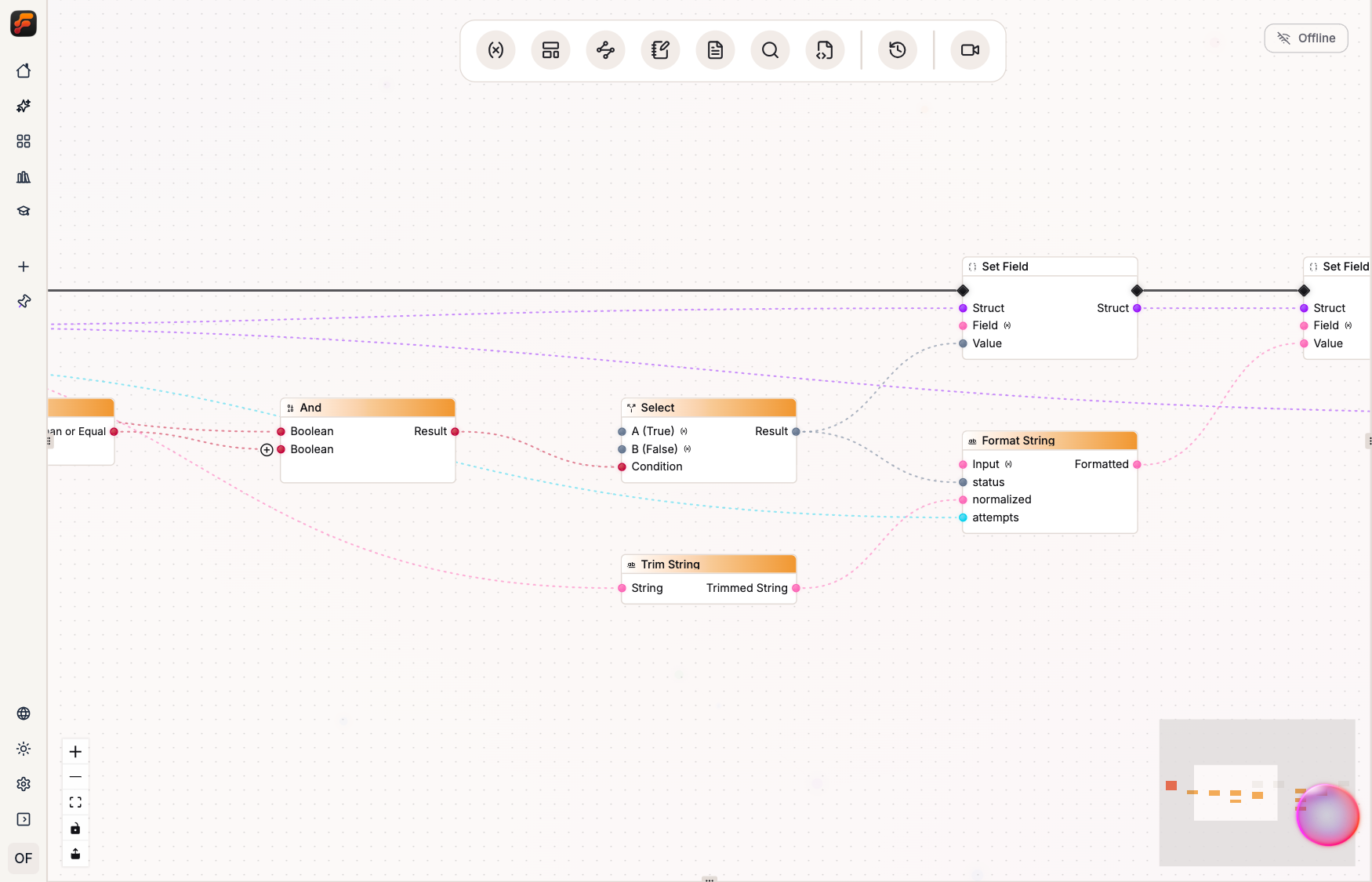
Select evaluates its condition and reads only the chosen data input. It exposes no alternative
Execution arms. Use a ternary for value selection; use if or a named execution-arm block when
only one side should call an external system, write data, or handle a failure. Chapter 10 covers
those paths. An impure expression still needs a place in the surrounding execution chain.
The condition must be Boolean, and both alternatives must fit the selected output contract. When schemas or container shapes differ, define an explicit common boundary instead of erasing the difference through Generic.
The renderer recognizes utils_types_select specifically. Its current condition, a, and b
inputs fit the ternary exactly. Unlike binary operator lowering, this path does not yet guard
against future configured inputs; the lossless-sugar test must grow if Select gains one.
9.4 Template literals are String Format nodes
Section titled “9.4 Template literals are String Format nodes”Template literals turn a format operation into readable prose:
let summary = `${status}: ${normalized} after ${attempts} attempt(s)`Apply converts that expression into one String Format node. Static text becomes its
format_string input. Each interpolation becomes a dynamic input pin:
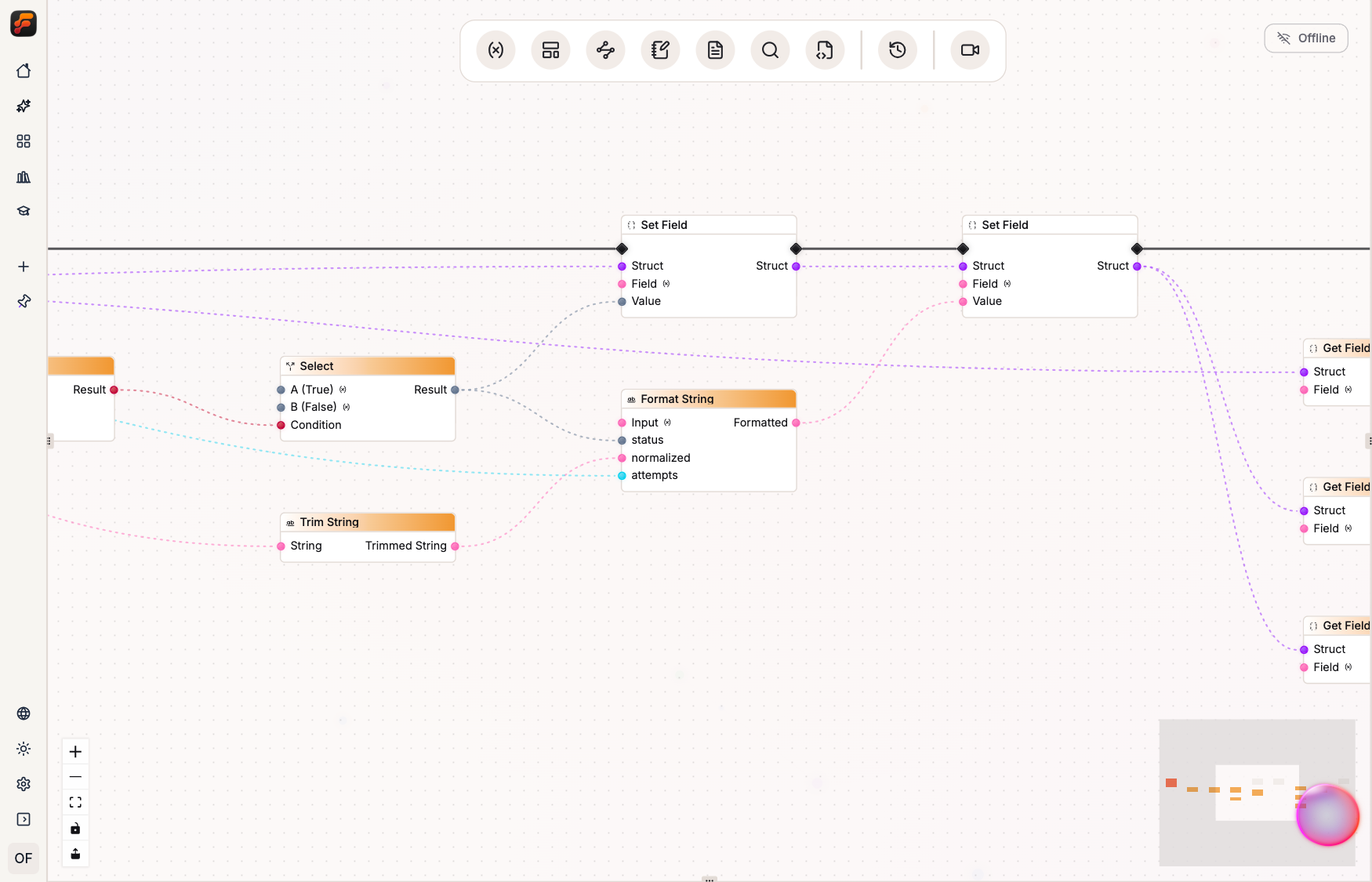
Simple references keep their names. Member or output access normally uses its final segment.
Complex expressions receive stable names such as arg1; collisions gain a suffix. Repeating the
same bare reference reuses one placeholder pin.
Dynamic pins are part of the node. The Board must know which wire supplies {status}, and rebuilt
text must produce the same pin set.
Literal text shaped like a placeholder, such as {status}, is ambiguous because String Format
would interpret it as a pin. FlowScript rejects that template. Use an explicit format call for a
placeholder; change the text when the braces should be literal, since the node cannot preserve an
escape.
The renderer returns to template syntax only when the round trip is exact. It requires:
- a literal format string;
- a value or wire for every placeholder;
- no extra meaningful input pins; and
- placeholder names that would be regenerated identically from the expressions.
If one of those checks fails, the Board renders the explicit call:
string::format({ formatString: "Incident {ticket}", ticket: externalId,})The explicit call prevents a dynamic pin from being renamed or a configured value from being dropped.
9.5 Field reads and writes are value flow
Section titled “9.5 Field reads and writes are value flow”A dot can select two different graph concepts:
let found = split.foundlet status = incident.statusThe first expression may name an output pin on split; the second reads a Struct field.
Reconciliation checks declared node outputs first, then uses a Struct field-access node when the
base is Struct-shaped. A named interface retains the field’s declared type, while an open Struct
produces a Generic boundary.
A current round-trip bug affects Generic Get Field, which exposes value and found. Board-to-text
lowering recognizes member access before checking the wired output, so found may render as
incident.status, which normally means the value. Until lowering checks the pin, use an explicit
call and named output when the presence flag matters.
const { value: status, found } = incident.get({ field: "status" })A field write is equally concrete:
incident.status = "closed"It lowers to Set Field with struct_in, the literal path "status", and the new value as inputs,
plus a struct_out output. FlowScript rebinds incident so later uses resolve to that output.
It helps to see the successive values on the Board:
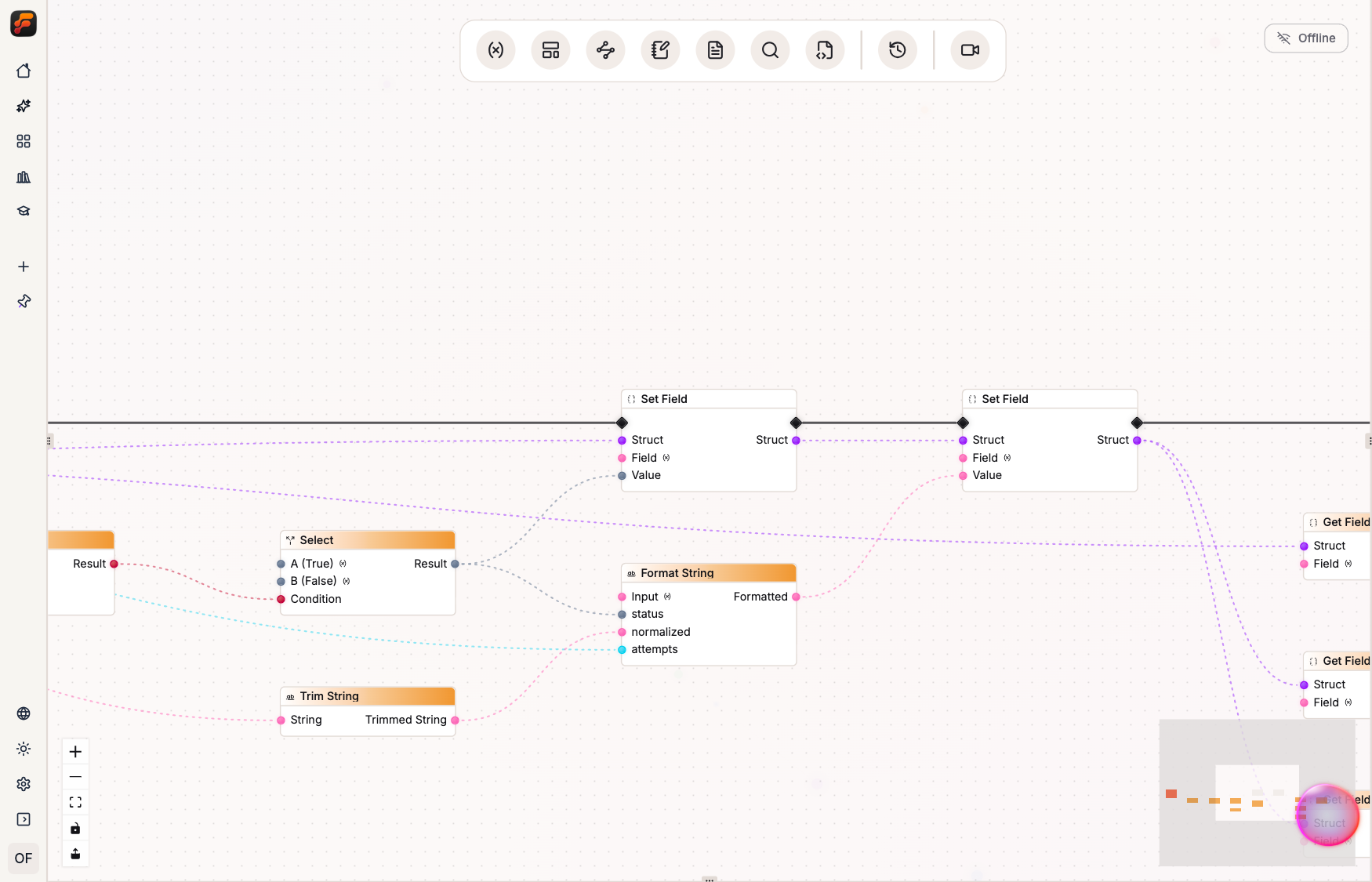
This is how source-level Struct mutation works. A consumer wired before the assignment keeps
incident@0. References after successive writes receive incident@1 and incident@2. The source
name selects the producer used by later expressions. Each operation’s pins carry the runtime value
for that version.
An unused updated Struct is simply an unused copy. Existing wires still point to their earlier producer.
Nested literal paths follow the same model:
incident.owner.name = "Ada"incident.affectedSystems[0].status = "degraded"A computed field requires an explicit Set Field call. The renderer uses dot assignment only for an accumulator chain whose output becomes the next value of the same binding. Seed operations, cross-source updates, and wired dynamic fields remain explicit.
9.6 Sugar must round-trip honestly
Section titled “9.6 Sugar must round-trip honestly”The chapter’s complete example applies all four kinds of readable sugar to the Incident Triage Flow:
use log::{ info }
eventsGeneric explainIncident(payload: Struct, incident: Struct, report: string, attempts: int, production: bool) {    const normalized = report.trim()    let urgent = production && (attempts >= 3)    let status = urgent ? "critical" : "investigate"    let previousStatus = incident.status    incident.status = status    incident.summary = `${status}: ${normalized} after ${attempts} attempt(s)`    info({ message: `${previousStatus} -> ${incident.status}: ${incident.summary}`, toast: false })}
The Flow trims a report, classifies repeated production trouble, remembers the old status, produces successive Incident values, and logs the transition. The graph shows the same logic:
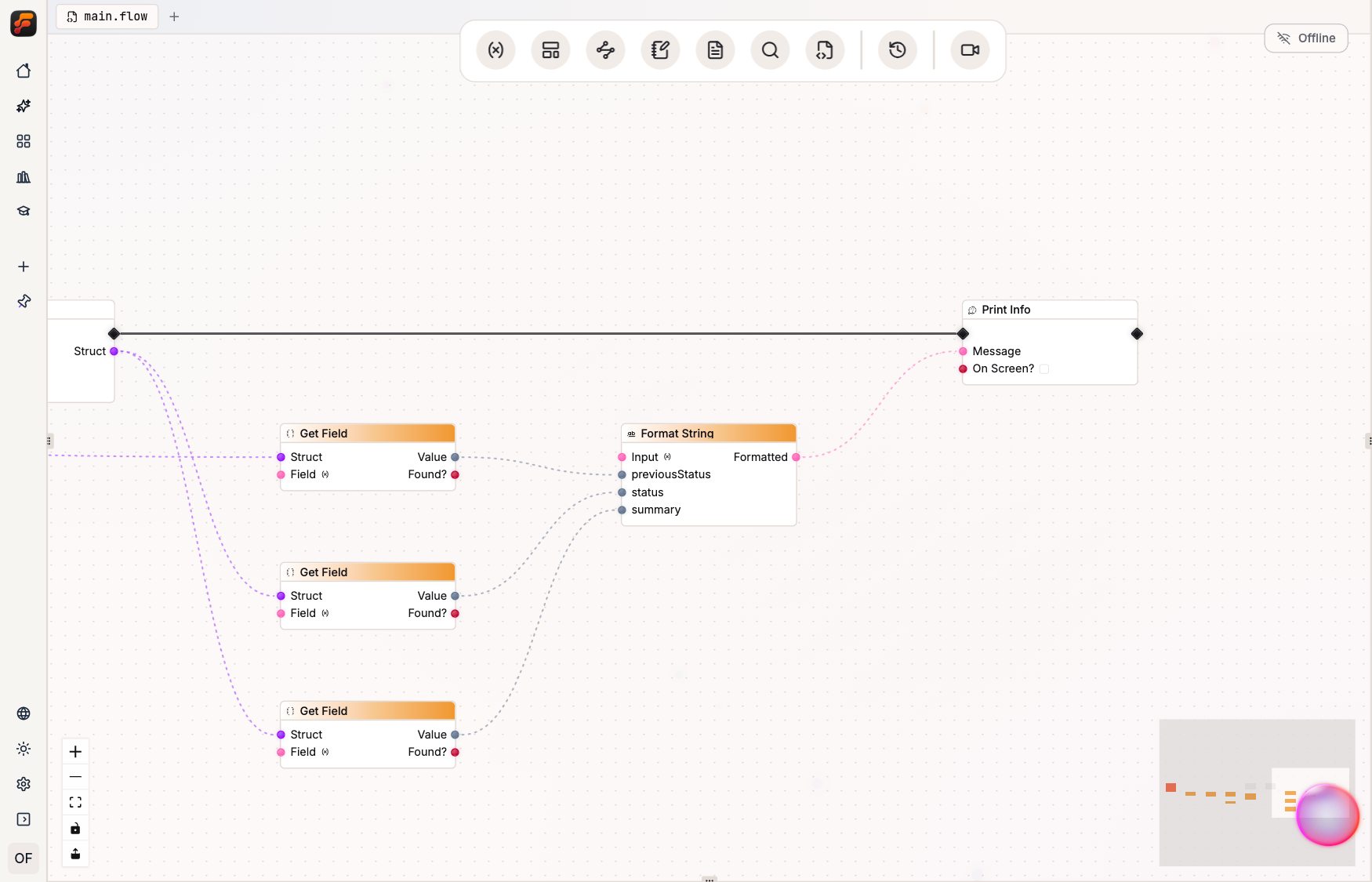
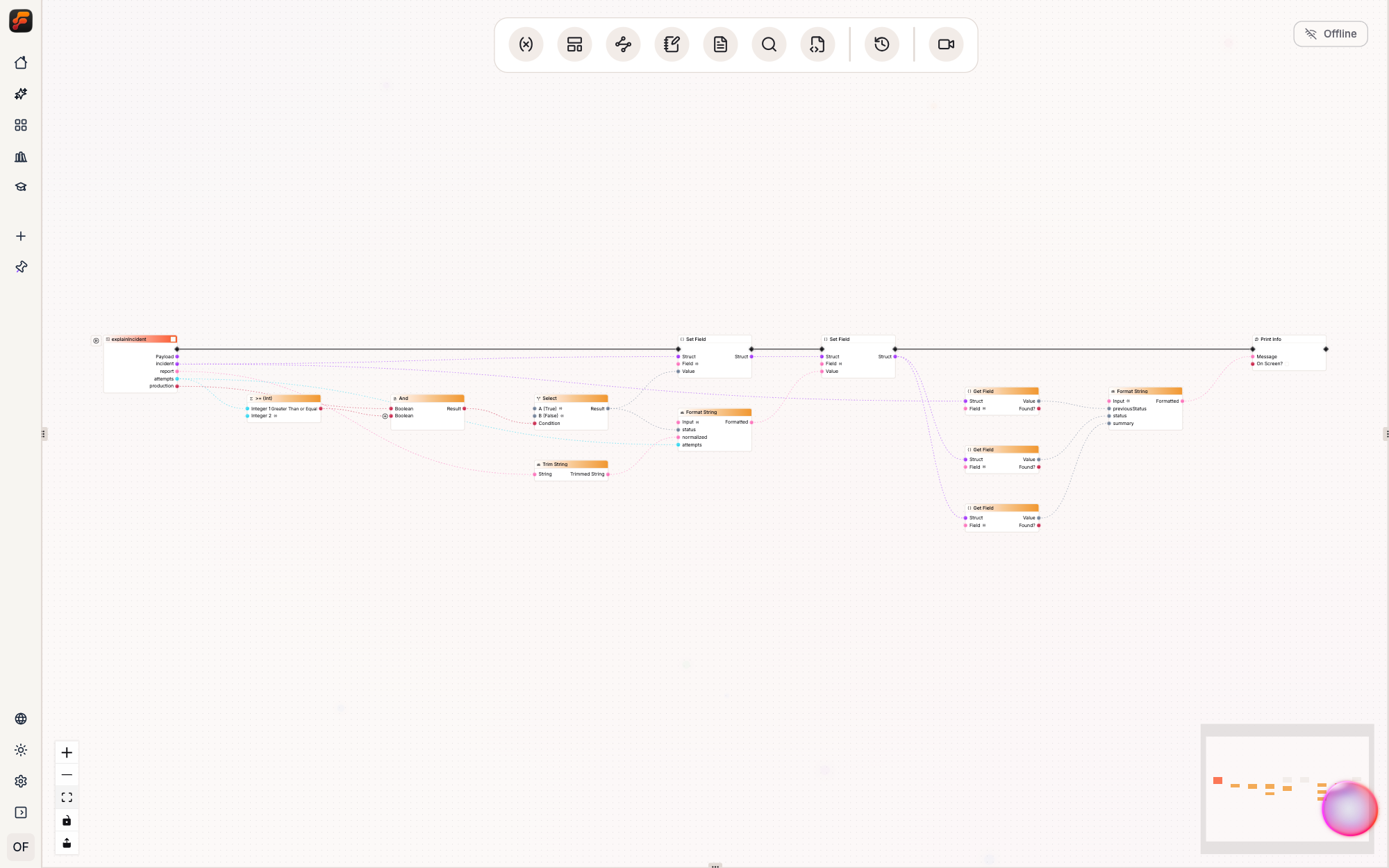
Board layout may change. Every meaningful source operation still has a node or pin value, and every meaningful configured input should survive when the Board becomes text. The release gaps above mark current exceptions.
Board-to-text lowering checks more than node type:
| Short form | It is rendered only when… | Otherwise… |
|---|---|---|
a op b | the node is a supported operator shape, its two operands are identifiable, and any omitted trailing inputs are untouched defaults | keep the catalog call |
c ? a : b | the node is the recognized Types Select contract; today it has exactly the three represented inputs | keep the catalog call |
`…${x}…` | the literal format and complete placeholder-pin set regenerate exactly | keep string::format(...) |
record.field = value | a literal-path Set Field is rebinding the same Struct accumulator | keep struct::set(...) |
String equality makes the rule tangible. With the case option untouched, a graph can render:
let same = left == rightWhen the node’s ignoreCase input is enabled, the operator can no longer carry the contract, so
the renderer preserves the setting:
const same = left.equal({ string: right, ignoreCase: true })Applying or switching views may make source longer when that is required to preserve the graph.
In the chapter example, the first Set Field may read back as an explicit seed alias, possibly named
record, while only the next same-accumulator update returns to record.summary = …. The fixture
shows canonical source, not guaranteed byte-identical Board readback. The graph and configuration
are the contract.
An invalid variant makes the boundary clear:
let urgent = report + attemptsThe parser recognizes the expression, but Apply cannot choose a node family. It reports the String/Integer conflict without inventing a conversion. Use formatting for a label, or parse the String and handle success for arithmetic.
Compact notation stays only when it carries the entire node contract. Otherwise, FlowScript shows the explicit node call.
The next chapter applies the same standard to if, named outcome arms, loops, while, and
return: every execution path must have a place on the Board.