13. Events, Interfaces, and Complete Apps
A correct Flow remains internal until someone or something can start it through a supported entry.
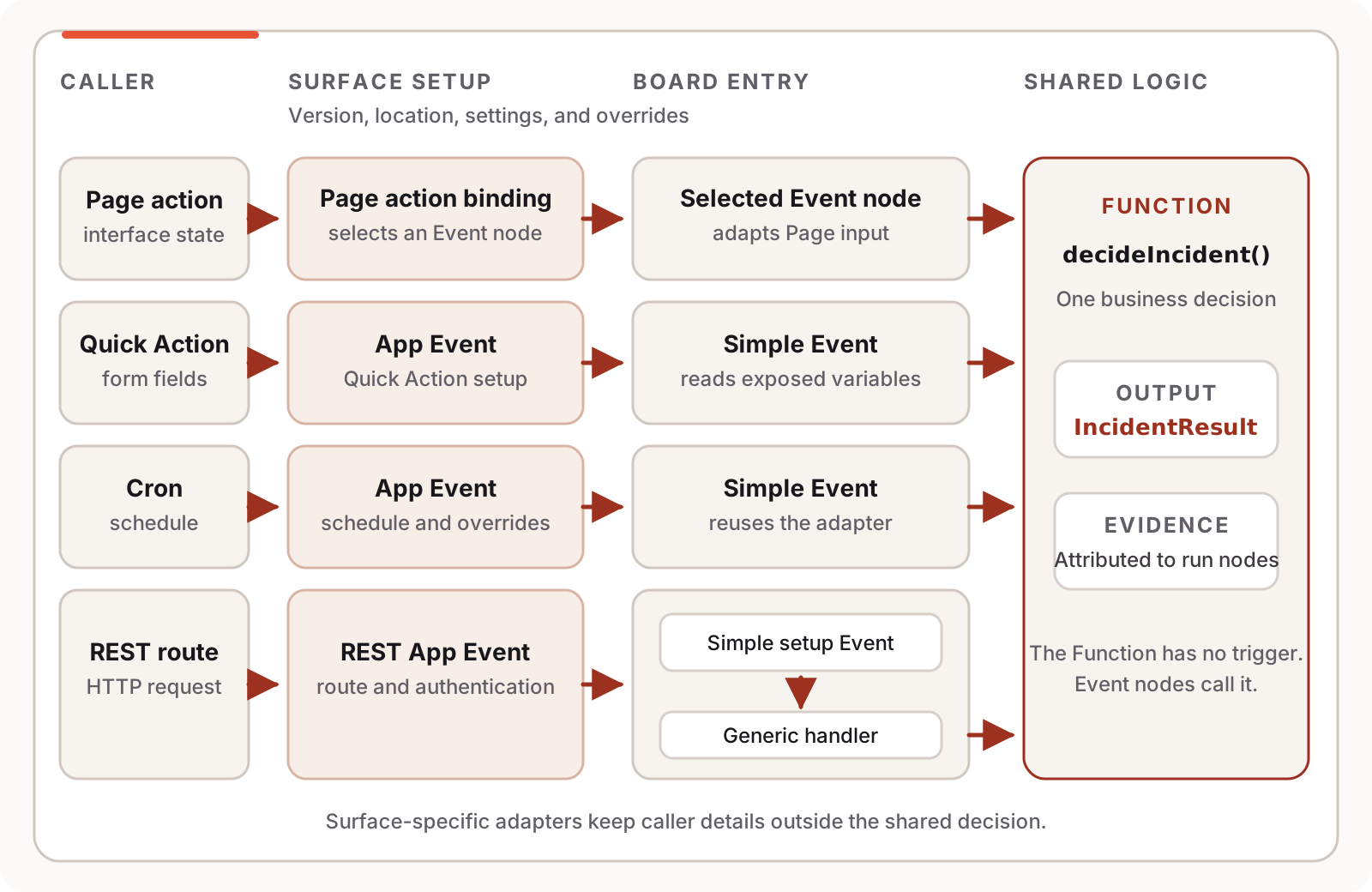
Here, the incident logic from the preceding chapters becomes an Incident Desk App. Its typed decision serves an App user, a schedule, and an authenticated REST caller. The interface is interactive, and each boundary can be governed, versioned, and traced.
Each surface gets an adapter suited to its caller while sharing one business function.
Release check: App Events bind compatible Flow entries to caller surfaces, configuration, variable overrides, execution location, and a Flow version. Roles govern Event execution and editing at App level; there is no per-Event ACL. Numbered versions work today. Weighted canary dispatch and some REST validation and evidence paths remain incomplete, as marked below.
13.1 An event node is an entry; an App Event is an exposure
Section titled “13.1 An event node is an entry; an App Event is an exposure”Event names two distinct objects.
An event node lives on the Board. It starts execution and defines what the Flow receives. A Simple Event has no data contract of its own. A Generic Event carries a payload and can expose typed output pins. Chat and Mail Events provide specialized contracts.
An App Event configures how callers reach that entry. It selects the Flow, event node, and either Latest or a numbered Flow version. It also owns the interface, execution location where the surface offers a choice, surface settings, variable overrides, protected secret values, and the release information for that exposure.
One event node may serve several compatible App Events with different schedules, settings, or variable overrides. A route change stays outside the business logic.
The event node defines the executable entry. The App Event defines its exposure.
An App Event cannot wrap every event node in every surface. Generic Events support Generic Form, API, and Deeplink setups. Simple Events support Quick Action, API, Cron, Daemon, Deeplink, REST, and MCP. Chat and Mail use specialized interfaces. The setup screen filters incompatible choices.
13.2 Keep one decision behind surface adapters
Section titled “13.2 Keep one decision behind surface adapters”Our shared decision has a deliberately small result. The caller-specific path ends at an Event node adapter; the Function itself has no trigger.
interface IncidentResult {    severity: string    team: string    runbook: string}
function decideIncident(    systemId: string,    report: string,    impact: string): (result: IncidentResult) {    // Deterministic classification and system-directory lookup}
This Function owns the rule. Each interface adapts its input to the function and returns the same structured result.
The Quick Action adapter is a Simple Event. Its fields come from exposed Board variables:
eventsSimple triageQuickAction() { const result = decideIncident(systemId, report, impact) info({ message: `Route ${systemId} to ${result.team}; open ${result.runbook}`, toast: false })}A Cron App Event can target the same Simple Event. With no interactive form, the schedule supplies variable overrides.
REST needs another adapter:
eventsGeneric triageRest( payload: Struct, systemId: string, report: string, impact: string, _client: Struct) { const result = decideIncident(systemId, report, impact) return result}Each named parameter becomes an output pin on the Generic Event entry. The dispatcher fills those
pins from the request; return publishes the REST response value.
_client carries trusted metadata from the authentication path, such as verified OAuth claims or a
connected-App identity. The authentication path supplies this trusted metadata. The Flow may use it for finer
authorization.
REST cannot register decideIncident directly because a Function has no trigger. Registration
stores the ID of a concrete Event handler, so triageRest provides that adapter.
Keep shared logic in the Function and caller-specific behavior in the adapter. The visible adapter makes an interactive action, unattended schedule, and public endpoint easy to distinguish.
13.3 Try the interactive Page
Section titled “13.3 Try the interactive Page”The /triage Page collects an affected system, report, and business impact. Its button invokes the
incident Event and renders the result.
The embedded React component is interactive. Change its values and press Triage incident. Its labelled local mock does not call Flow-Like or an external endpoint.
Embedded React prototype
Incident Desk
Route an interruption to the people and runbook that can resolve it.
- Responsible team
- payments-on-call
- Runbook
runbooks/payments.md
workflow_event → triageQuickActionExample output is ready. Change the form to preview another response.
A production Flow-Like Page uses A2UI. Its component tree contains typed fields, a select, a button, and result cards. Components used during execution are marked event-relevant. The button action identifies the event node:
{ "name": "workflow_event", "context": { "nodeId": "<triage-page-event-node-id>" }}The action context carries routing identity. On invocation, the client combines current Page elements and relevant values into the payload. The Flow reads them through A2UI catalog nodes, so no hidden JavaScript callback controls the button.
A UI App Event points to the Page and owns its route, such as /triage. Today the interface
requires authentication. Anonymous Page hosting remains planned.
13.4 Quick Action and Cron reuse one entry
Section titled “13.4 Quick Action and Cron reuse one entry”The Quick Action can expose the three ordinary variables declared in the fixture:
let systemId = "payments"let report = "Production is on hold"let impact = "production-stopped"An App user edits those fields and invokes triageQuickAction. A second App Event can target the
same entry for a periodic job, overriding the values without editing the Board.
The effective value order is:
- a permitted invocation/runtime override;
- the App Event’s variable override; and
- the Board default.
Flow authors choose which variables participate in configuration. Secret variables are handled separately and omitted from ordinary read responses. The REST API key has no source value:
@description("API key configured on the REST App Event")@secretconst incidentApiKey: stringIts App Event supplies the protected value. The caller’s API key grants entry at the REST boundary; forwarding credentials to another system requires a separate decision.
13.5 A REST App Event is a setup program
Section titled “13.5 A REST App Event is a setup program”A single API Event exposes one configured endpoint. For REST, the Flow builds a server configuration, registers handlers and authentication, publishes OpenAPI routes, then reaches the REST Server node.
The canonical fixture performs that setup as follows:
eventsSimple configureIncidentRest() { const base = serverConfig({ host: "127.0.0.1", port: 0, tls: { secure: false } }) const routed = base.registerFunction({ path: "/triage", method: "POST", fnRefs: [triageRest] }) const secured = routed.registerAuth({ auth: apiKey({ header: "x-api-key", key: incidentApiKey }) }) const documented = secured.registerOpenApi({ path: "/openapi.json", uiPath: "/docs" }) const address = server({ config: documented }) address { onListening: { info({ message: "Incident REST surface registered", toast: false }) } onClose: { info({ message: "Incident REST surface closed", toast: false }) } execError: { warn({ message: "Incident REST setup failed", toast: false }) } }}fnRefs: [triageRest] is reference metadata. It tells Register REST Function which handler to
publish. Register one handler per remote route: remote setup persists the first reference, while
the local socket implementation can invoke several.
Create the App Event with these settings:
- Target
configureIncidentRest. - Select REST, Remote, and the intended Public or Internal exposure.
- Pin a tested numbered Flow version.
- Configure the
incidentApiKeysecret override. - Choose a stable alias such as
incident-desk. - Save and inspect the setup status and registered routes.
In a remote runtime, REST Server emits its configuration to the platform instead of binding a long-lived socket during setup. Saving the App Event runs the setup, checks that it reached REST Server, and persists the route and authentication registrations.
Setup is part of the release. A new REST Event rolls back when its first setup fails. If an update fails, traffic keeps using the last successful setup while the builder sees the error.
After a successful setup, the public paths have this shape:
POST /r/incident-desk/triageGET /r/incident-desk/openapi.jsonGET /r/incident-desk/docs13.6 The HTTP boundary is structured and still evolving
Section titled “13.6 The HTTP boundary is structured and still evolving”Call the route with an API key and JSON body:
POST /r/incident-desk/triagex-api-key: <configured secret>content-type: application/json
{  "systemId": "payments",  "report": "Production is on hold",  "impact": "production-stopped"}
The handler returns one object:
{ "severity": "SEV-1", "team": "payments-on-call", "runbook": "runbooks/payments.md"}A plain value becomes a 200 application/json response. For more control, return an envelope with
status, headers, content type, and body.
For named parameters, JSON object fields overwrite same-named query values. Reserved parameters
provide the request, method, path, query, headers, raw body, and _client metadata. Keep the public
contract small; accepting the whole request makes later compatibility harder.
Flow-Like publishes OpenAPI JSON and an interactive browser UI. The remote document describes routes, methods, and authentication, while request and response bodies remain open objects. The local socket implementation has richer pin-derived request schemas. The remote router does not yet enforce declared Flow types before execution.
The design target is stricter than the current release:
Doctrine: Reject a request at the earliest boundary where its incompatibility is known, and record the rejection as execution evidence.
Malformed JSON, authentication failure, and unmatched routes are rejected before dispatch. Field values are not yet checked against the handler pin schema at the edge; a mismatch may fail later when a node evaluates its typed pin.
Pre-dispatch rejections do not appear as Runs. The status model has Pending, Running, Completed, Failed, Cancelled, and Timeout, with no Rejected state. Invalid JSON, failed authentication, and unmatched routes can return before a Run row exists. A type error that reaches execution can appear as a failed Run. The intended design records attributable rejection evidence without claiming that the request executed.
13.7 Identity, permission, and credentials are different boundaries
Section titled “13.7 Identity, permission, and credentials are different boundaries”App members need Execute Events to invoke an Event. Builders need Write Events to create, activate, reconfigure, or repoint one. Owners and admins inherit these permissions; custom roles may receive them. App Events have no separate ACL.
After entry, user-context nodes expose the subject, role, permissions, and role attributes. The Flow can then ask whether the caller may triage payment incidents. The context model also supports custom attributes, though the normal audited API path does not yet populate all of them.
REST adds another boundary:
| Concern | What answers it |
|---|---|
| May this App member invoke ordinary Events? | App role and ExecuteEvents |
| May this network caller enter the REST route? | Configured REST authentication |
| Which connected App called an Internal route? | Connected-App proxy identity and role |
| May this caller perform the domain action? | Explicit checks inside the Flow |
| Which credentials may nodes use downstream? | Caller or App Event/sink credentials, chosen for that execution setup |
Public REST supports unauthenticated access, API keys, static bearer tokens, Basic authentication, HMAC-SHA256, and OAuth/OIDC bearer validation. This exercise uses an API key. Leaving Register REST Auth disconnected creates an unauthenticated surface and requires deliberate review.
An API key does not identify a person. Verified OAuth claims can add subject, issuer, audience,
scopes, and related metadata to _client. An Internal REST Event uses an approved App connection
instead of the public router, while still enforcing authentication configured on the registration.
Interactive invocations may use the signed-in caller’s credentials. Unattended and public sinks normally use credentials stored with the App Event or sink. Platform storage credentials have their own scope. Preserve those distinctions in the audit trail.
13.8 Hybrid applies to Boards
Section titled “13.8 Hybrid applies to Boards”Boards support Local, Remote, and Hybrid execution modes. App Events support only Local or Remote.
- A Local Board forces its App Events local.
- A Remote Board forces them remote.
- A Hybrid Board preserves the Local or Remote choice made for each App Event.
- The web client dispatches through the remote backend; Studio can execute locally.
- A remote REST App Event is Remote by definition.
Hybrid lets builders work locally in Studio while the web experience runs on governed remote infrastructure. Each invocation still has one location. Its nodes may call remote systems, but the Flow run does not move between runtimes.
13.9 Pin the contract before other people depend on it
Section titled “13.9 Pin the contract before other people depend on it”An App Event can follow Latest or target an immutable numbered Flow version. Latest exercises every saved Board change during authoring; production APIs should use a stable version.
Use this release sequence:
- Develop and test against Latest.
- Save a numbered Flow version after the Page, Quick Action, and REST handler pass their cases.
- Point the production App Events at that version.
- Run REST setup and verify its route, authentication, OpenAPI document, and one failure case.
- Promote the change through the organization’s admin/builder review.
- Keep the prior version available for an explicit rollback.
Callers cannot override the configured Flow version. REST registrations also keep a setup version and a pointer to the last successful setup. The Flow version freezes the Board snapshot; the setup version selects the published route configuration. Catalog implementations, Event configuration, data, credentials, and external systems retain their own lifetimes.
Weighted canary rollout is not yet a runtime guarantee. The model stores a canary target and weight; audited invocation paths still select the primary target. Treat canary settings as product intent until weighted routing is implemented and tested end to end.
13.10 The complete App checklist
Section titled “13.10 The complete App checklist”The Incident Desk is complete enough to hand to another team when all of these questions have answers:
- Entry: Which Board event begins each use case?
- Contract: What typed values enter, and what structured value returns?
- Interface: Is the caller using a Page, Quick Action, schedule, REST route, or another surface?
- Identity: Who or what is calling, and what further domain authorization is required?
- Credentials: Which secrets may this execution use after entry?
- Location: Is this App Event Local or Remote?
- Release: Which immutable Flow version and successful setup are live?
- Evidence: Where does a successful run, failed run, or pre-run rejection appear?
The evidence item exposes a current gap: rejected requests should leave an attributable record just as failed execution does.
At that point, another team can operate Incident Desk without first learning its internal graph. When they inspect a run, its evidence still leads to the responsible block.