4. First Flow: Incident Triage in Two Views
Our first Flow accepts an incident report, normalizes the text, classifies it with a deterministic rule, and records the decision at the appropriate log level. It uses no external services, so any change in behavior can be traced to the input or one of six visible nodes.
We will edit the same Flow on the canvas and in FlowScript, inspect a run, and save a known-good version.
Release check: The source follows the current renderer’s canonical event-parameter and import conventions and round-trips through the parser and renderer. Its six mappings match the generated node declarations and reconciliation tests. Exact canvas gestures, an end-to-end run, screenshots, and the malformed-input trace still need verification against the release used for publication.
4.1 The contract: accept, classify, respond
Section titled “4.1 The contract: accept, classify, respond”The smallest useful incident record for this exercise has one field:
report: stringThe Generic Event also exposes its built-in payload: Struct. That payload is the original
event object or envelope. We will leave it unused and work through the named, typed report
output so the contract stays obvious.
The Flow applies one rule:
- Remove whitespace from the beginning and end of the report.
- Look for the phrase
production is on hold, without regard to letter case. - If the phrase occurs, write the normalized report as an Error log.
- Otherwise, write it as an Info log.
Here, “respond” means writing to the run log. API responses, notifications, and incident storage can wait until we understand the two authoring views.
The literal phrase check is only a teaching rule. Given the same string, it always takes the same branch, which makes the Flow useful as a test fixture.
Three inputs will matter later:
| Case | Input |
|---|---|
| Normal | Database latency is elevated, but production continues. |
| Urgent | PRODUCTION IS ON HOLD after an interface timeout. |
| Malformed | A payload in which report is not a string, such as {"report": 42} |
The normal report follows the Info path. The urgent report loses its surrounding spaces, matches despite its capitalization, and follows the Error path.
The malformed case depends on the release and invocation surface. A typed form may block the submission, an API adapter may reject it before the Board starts, or a string node may reject it during the run. We will record the observed boundary.
The log::error operation records an Error-level message and completes successfully. Some run
lists may still color or classify the run from its highest log severity. Check the node evidence
before treating an urgent classification as a runtime failure.
4.2 Build it visually
Section titled “4.2 Build it visually”Create an App named Incident Triage, then create one Flow inside it. The initial Board contains six operations:
| Node | Catalog identity | Responsibility |
|---|---|---|
| Generic Event | events_generic | Starts the Flow and exposes report: string |
| Trim String | string_trim | Removes leading and trailing whitespace |
| Contains | string_contains | Checks the normalized report for the incident phrase |
| Branch | control_branch | Selects the urgent or normal execution path |
| Log Error | log_error | Records an urgent report |
| Print Info | log_info | Records a normal report |
Displayed names may change. Catalog identities are the version-matched references used to verify the source mappings.
Begin with the Generic Event. Rename it Triage Incident, which gives the entry its
triageIncident source alias, and add a string output named report. A Generic Event already
provides its execution output and payload; FlowScript can additionally define named, typed
outputs such as this one.
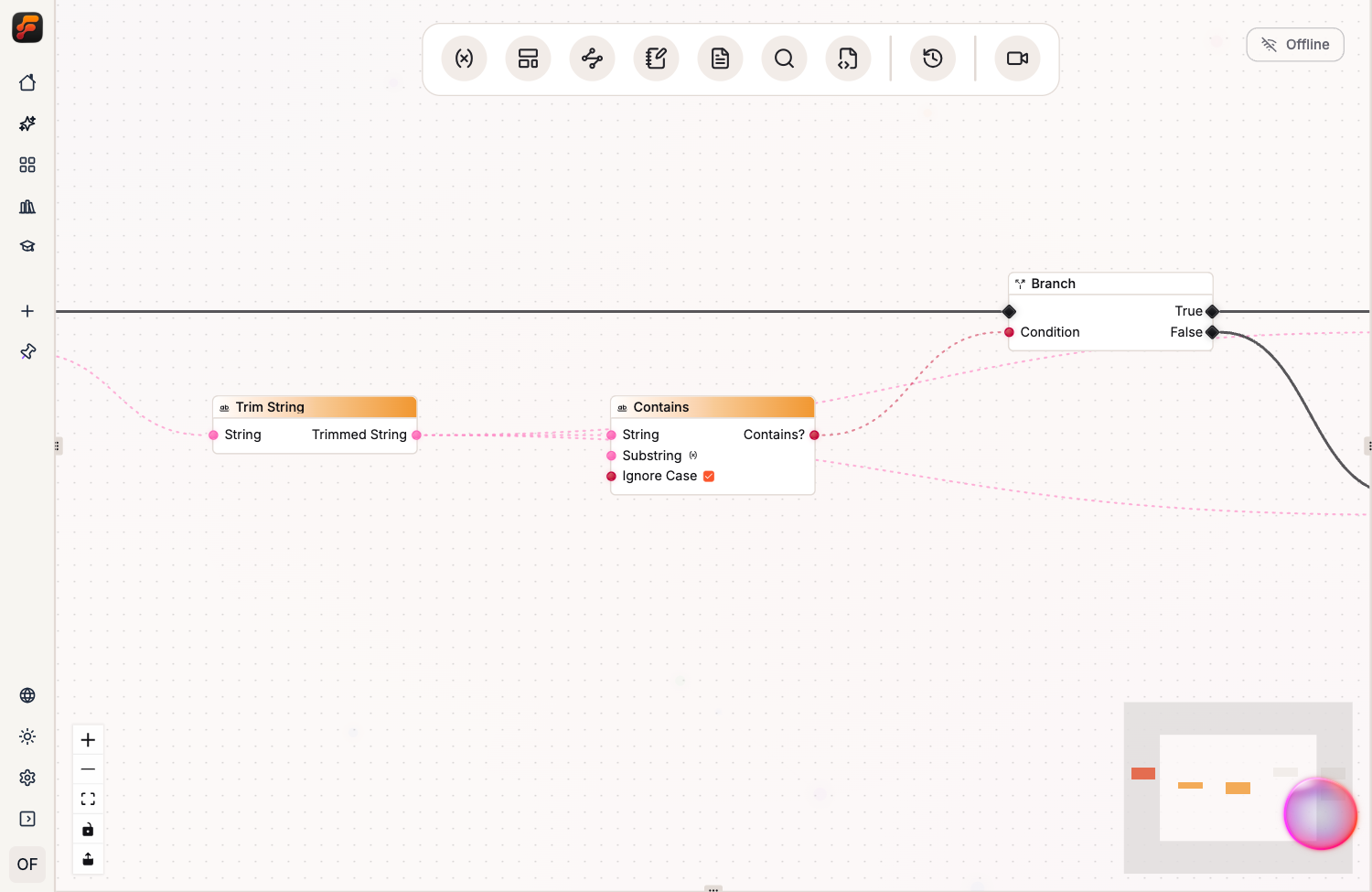
Connect the report value to the String input of Trim String. Connect Trimmed String to the
String input of Contains. Configure Contains with the substring
production is on hold, and enable its case-insensitive comparison.
The data path is now visible on the canvas:
The execution side is shorter. Connect the Generic Event execution output to the Branch input. Connect the Branch’s True output to Log Error and its False output to the Info log node.
Connect the normalized string from Trim String to the Message input of both log nodes. Set the on-screen notification option to false for each. We want recorded run evidence, not a temporary toast.
The completed Flow has two kinds of wires:
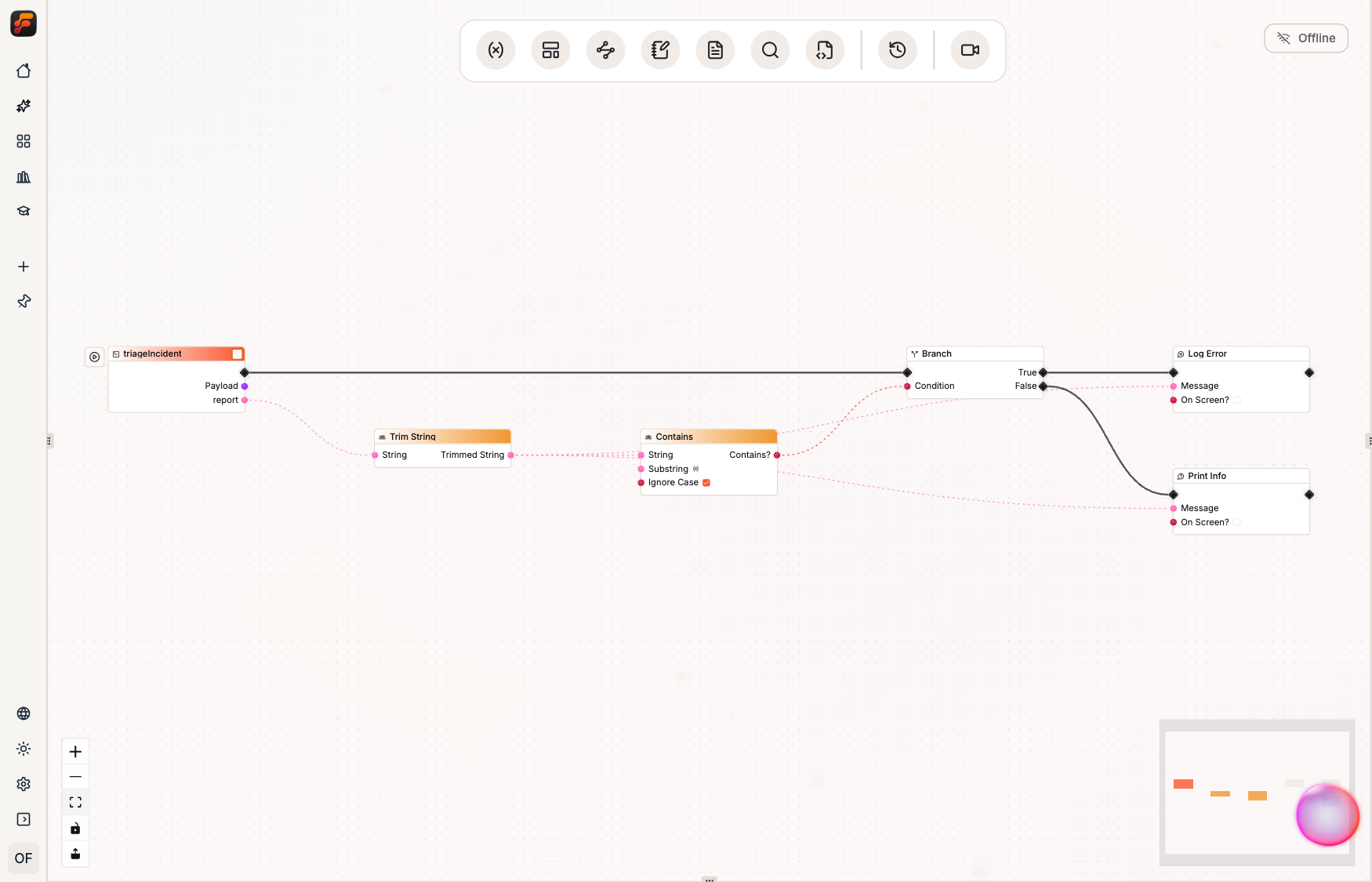
Trim String and Contains need no execution wires. They are pure operations, evaluated when Branch needs its condition. Branch and the log nodes are impure because their place in the execution path matters. Data wires answer “Where does this value come from?” Execution wires answer “When does this work happen?”
Before opening the text view, read the Flow from left to right:
When an incident arrives, trim its report. If the normalized report contains “production is on hold,” log an error. Otherwise, log information.
If the canvas does not communicate that sentence, improve the layout before moving on.
4.3 Read the same Flow as source
Section titled “4.3 Read the same Flow as source”Open the FlowScript view of the Board. Ignoring the identity anchors that the editor may append, the program is:
use log::*
eventsGeneric triageIncident(payload: Struct, report: string) {    const normalized = report.trim()    if (normalized.contains({ substring: "production is on hold", ignoreCase: true })) {        error({ message: normalized, toast: false })    } else {        info({ message: normalized, toast: false })    }}
FlowScript is the typed text form of the Flow logic shown on the Board. This source and the canvas describe the same six nodes.
The import at the top tells FlowScript that unqualified logging calls come from the log
namespace:
use log::*The renderer derives this glob import because the Flow uses several static calls from log.
Fully qualified calls such as log::error(...) remain valid.
The event declaration describes the entry node:
eventsGeneric triageIncident(payload: Struct, report: string) {eventsGeneric identifies the event kind. triageIncident names this entry. payload: Struct
is built in; report: string is the typed output we added.
The next line contains one binding and one method-shaped node call:
const normalized = report.trim()report.trim() represents the visible Trim String node. For nodes with a receiver pin, the value
left of the dot supplies that input. The default output becomes normalized.
The condition contains two more operations:
if (normalized.contains({ substring: "production is on hold", ignoreCase: true })) {normalized.contains(...) is the Contains node. The receiver supplies its String input; the
object supplies the substring and comparison option. Its Boolean output feeds Branch.
The if block renders the Branch node as control flow. Its first block is the True output and
else is False.
Each statement inside those blocks is an impure logging node:
error({ message: normalized, toast: false })info({ message: normalized, toast: false })The import makes these aliases available without a prefix. In a fully qualified call, ::
separates the namespace from the node alias. A dot accesses a field or receiver operation. The
object keys are input pins.
The editable view may include identity anchors such as //@n:.... They associate a statement
with an existing Board node. The book hides them for readability; preserve them while editing
unless deletion is intentional.
FlowScript accepts semicolons but does not require them. Canonical rendering omits them. That formatting choice does not change the Board.
4.4 Change text, watch the graph
Section titled “4.4 Change text, watch the graph”Change the urgent phrase in the Contains call:
substring: "customer orders are blocked"Before applying, inspect the reconciliation preview. It checks the source against the current Board and plans the change without mutating the saved Flow.
The exact number of internal commands may change between releases. Check that the preview updates the existing node instead of replacing the Flow or all six nodes. If it does more, inspect the source and its anchors.
Apply the edit to the Board. Then locate the Contains node and inspect its configured substring. The Flow should now express the new rule while its structure and node identities remain intact.
The edit is parsed and reconciled into the existing Board.
Use source-to-node navigation if the release provides it. Publication verification should capture the pending plan and changed node.
Once you have seen the round trip, restore the original phrase and apply it again. The
remaining examples use production is on hold.
4.5 Change the graph, watch the text
Section titled “4.5 Change the graph, watch the text”Now travel in the other direction.
On the urgent execution path, insert a Log Warning node before Log Error. Give it the normalized report as its message and keep its on-screen notification disabled. The True path should enter Log Warning and then continue to Log Error.
After the Board change has been saved, re-render FlowScript from the Board. The urgent branch should be semantically equivalent to:
if (normalized.contains({ substring: "production is on hold", ignoreCase: true })) { warn({ message: normalized, toast: false }) error({ message: normalized, toast: false })} else { info({ message: normalized, toast: false })}The final rendered text may include anchors and release-specific canonical formatting. Verify the actual output rather than copying those details from this draft.
The canvas edit changed the Board; newly rendered FlowScript now describes that change.
When the Board changes under a dirty FlowScript buffer, Studio blocks Apply until you refresh or merge the stale buffer and resolve every three-way merge conflict. Render fresh FlowScript after a canvas change.
Remove the temporary warning and confirm that the source has returned to the six-node baseline.
4.6 Break it on purpose
Section titled “4.6 Break it on purpose”Run the Flow first with the normal report:
{ "report": "Database latency is elevated, but production continues."}Select the resulting run and inspect its logs. The rule predicts an Info message containing the normalized report. The Error log node should not execute.
Next, run the urgent case:
{ "report": " PRODUCTION IS ON HOLD after an interface timeout. "}The rule predicts that Trim String removes the surrounding spaces, Contains returns true despite the capitalization, and the Branch follows its True output. The resulting message should be recorded at Error level without an on-screen toast.
The Log Error node still completed successfully. Some run lists use the highest log level for color or classification, while remote execution stores completion status and log severity separately. Read the node-attributed evidence before deciding whether the run failed.
Now try the malformed payload:
{ "report": 42}Record what the chosen release actually does.
Before final publication, run this case through the same invocation surface used in the screenshots and record the actual boundary:
- If the interface refuses the payload, document the typed input rejection.
- If an App Event adapter rejects it, document that the Board did not start.
- If it reaches the Board and a string operation fails, record the failing node and its error.
- If the value is coerced or defaulted, document that behavior and decide whether the fixture needs a different deliberately failing input.
Do not assume Trim String failed because it is the first string node. The platform may reject the wrong type earlier.
When a true node failure is available, open its run and navigate from the relevant log entry to the responsible node. Capture the input, Flow version, run identifier, log level, message, and focused node. That record gives the next responder a concrete place to start, which matters far more on a Board with hundreds of nodes.
4.7 Save the first known-good version
Section titled “4.7 Save the first known-good version”Return the Board to the six-node baseline and rerun the verified test matrix for the release you are using. At minimum, preserve the normal and urgent runs. Add the malformed-input case once its expected boundary has been established and documented.
Then create an immutable Flow version. Use the semantic increment that matches your release policy; for a compatible correction to an existing Flow, that would normally be a Patch version. The current draft remains editable, while the numbered version becomes a read-only snapshot.
Record with the snapshot:
- the canonical FlowScript rendered from the Board;
- the test inputs and their expected log levels;
- the Flow-Like release against which they were run; and
- the observed malformed-input boundary.
A production-facing App Event can later target that numbered version instead of Latest. New work can continue on the draft without silently changing the entry point used by callers. When the next version is ready, test it and deliberately move the Event.
The saved version now contains one tested Flow whose canvas and FlowScript views describe the same logic. Chapter 5 explains how its data and execution wires behave at runtime.